
The short answer
Build the architecture around a question whose answer you can verify.
Map source authority, meaningful relationships and the path back to evidence.Design for the questions, then the folders
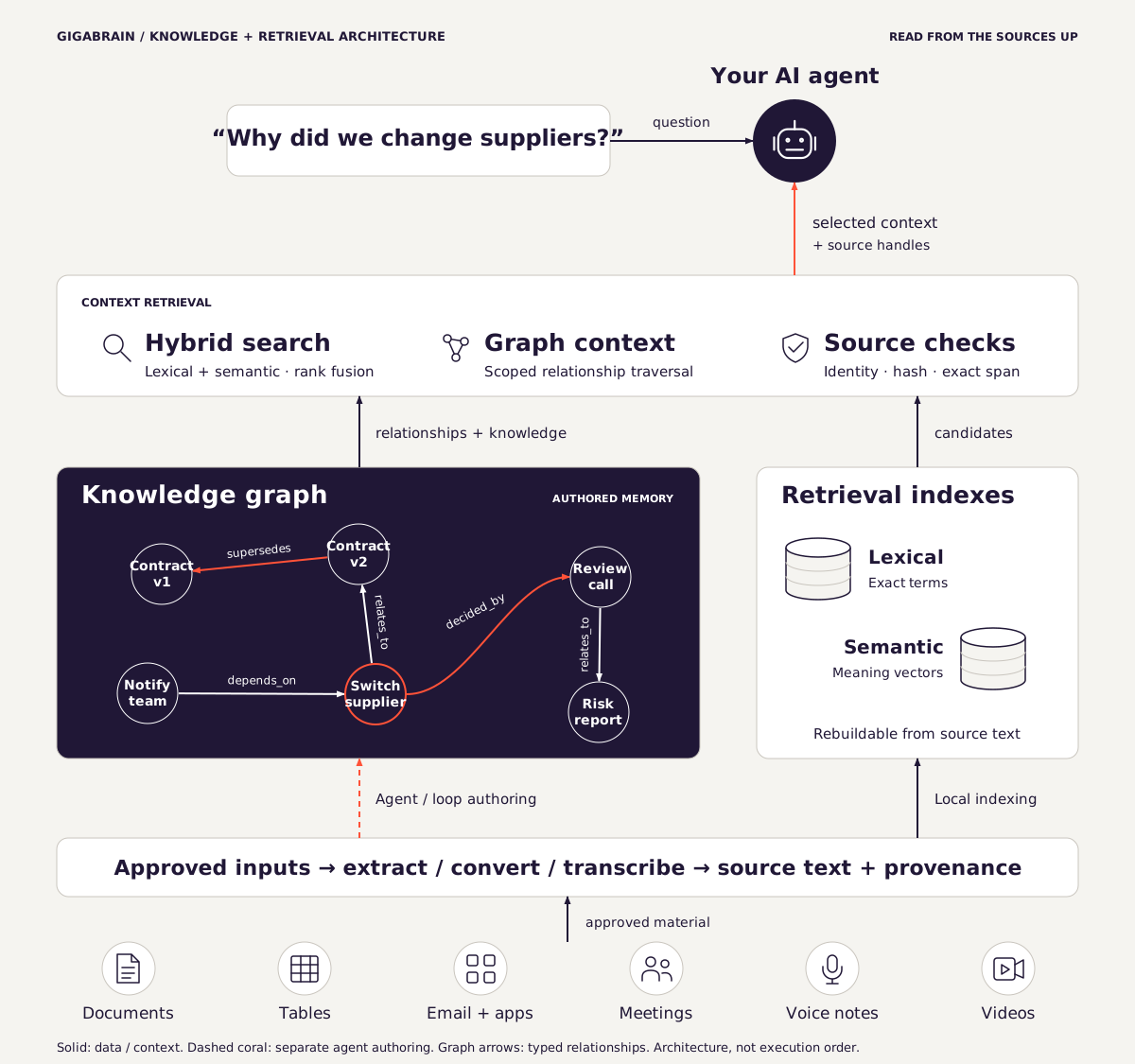
Knowledge architecture is how you organize sources, the knowledge you take from them, and the connections between them. Your agent uses that structure to find evidence for a task. You should be able to follow its answer back to the source.
Start with a recurring decision. For a project review, you might need to know what changed, who agreed to it, which deadline applies and what remains unresolved. A folder called "Important" cannot express those distinctions. A structure that preserves projects, decisions, dates and source references can.
Bring different sources into the same architecture
Your knowledge may start in a PDF, a spreadsheet, an email thread, a meeting, a voice note or a video recording. The original medium and the text used for retrieval are different things. Keeping that distinction visible helps you understand what the system can search and what still needs preparation.
Gigabrain ingests supported text and tabular files, plus text-bearing PDFs when an extractor is available. The file preparation tool handles supported Word, Excel and email formats. Local audio and video speech transcription needs extra tools and a downloaded model. Scans need a separate text extraction tool. Speech transcription does not inspect photographs or video frames. Keep the original alongside its prepared text where the workflow calls for it. Exact-span verification can check the prepared passage, but it does not prove that an OCR tool or transcription was accurate.
App data arrives through the exports or enabled agent connectors you configure. Mail, calendar and accounting streams have different permissions and formats. An ingestion loop can process the approved feeds on its configured schedule. It does not grant access to every app or scan the whole computer. Register one source route, verify that a real passage can be retrieved, then expand. See document preparation and chunking and meeting decisions with evidence for worked guidance.
Map each layer to a responsibility
| Layer | Example | Rule |
|---|---|---|
| Originals | A meeting transcript or signed amendment | Preserve the input. Record where it came from. |
| Knowledge notes | One sourced decision about delivery | Keep a claim small enough to verify. |
| Relationships | An amendment supersedes a prior decision | Name the relationship. Do not treat every link as equivalent. |
| Retrieval | Selected passages for a project question | Keep derived indexes rebuildable. |
| Output | A project brief with citations and unknowns | Keep evidence distinct from suggestions. |
In Gigabrain, original material, curated knowledge and the retrieval corpus have distinct roles. The knowledge area includes Sources, MOCs and Process material. The retrieval corpus is derived material. See the product mechanism before designing imports around these boundaries.
Work through one changed decision
Consider this fictional example. A meeting note says "Project North ships on 12 October." A later amendment says "Project North now ships on 18 October." A project summary should retain enough history to explain the change without presenting both dates as equally current.
Original decision: delivery on 12 October. Source: meeting note.
Amendment: delivery on 18 October. Source: dated amendment.
Relationship: amendment supersedes original decision.
Answer: current delivery is 18 October, citing the amendment and identifying the earlier date as replaced.
A link is not proof. Someone must verify that the amendment concerns the same project and actually replaces the relevant commitment. Gigabrain's graph validation checks supported structure. It cannot establish whether the business statement is true.
Use relationships only when they carry meaning
Gigabrain supports typed relationships including supersedes, contradicts, depends_on, caused, decided_by and relates_to, with corresponding inverse relationships. They help express distinctions a generic backlink leaves implicit.
For example, "depends on" describes a prerequisite. "Caused" asserts an explanation. Do not infer causation merely because two events occurred close together. Reserve contradiction for claims that cannot both apply in the same scope and time. Two different project dates may be perfectly consistent.
Inspect the graph model and example for the product's supported representation. Start with the relationships your test questions need. Add more only when someone can keep their meaning consistent.
Save the passage behind each answer
For each answer, record the source path, relevant passage and the question that selected it. A good test set should include an exact identifier, a paraphrased question, a changed fact, an absent answer and a similarly named project. These cases expose different weaknesses.
If retrieval misses a known source, inspect import coverage and the index before changing the reasoning prompt. If retrieval finds the right source but the answer misstates it, inspect the agent's instructions and response. If the source itself is outdated, repair the knowledge.
Specify a source contract before importing
A source contract records what a document is allowed to establish. A meeting transcript can establish what somebody said. It may not establish that a proposal was approved. A signed amendment may outrank an earlier draft, but only for the matters it actually changes. The agent needs enough context to preserve these distinctions.
| Field | Why it matters | Illustrative value |
|---|---|---|
| Source identity | Distinguishes revisions and similarly named files | North / amendment / revision 2 |
| Authority | Separates proposals from approved decisions | Approved by the project owner |
| Time | Separates publication, effective and import dates | Effective date stated in source |
| Scope | Limits where the fact applies | North delivery. Not South |
| Review status | Keeps uncertainty visible | Verified against paragraph 2 |
Do not turn this into mandatory clerical work for every casual note. Use the fields when they change how a consequential answer should be interpreted. A research bookmark may need a URL and publication date. A client commitment needs a clearer authority record.
Before connecting the graph, sketch the intended path from question to answer. For "why did the date change?", that path should reach both the current amendment and the decision it replaces. If the path ends at an agent-written summary, make sure the summary still points to the original.
Use the source-contract worksheet with one representative project. The worksheet is a design aid, not a schema Gigabrain requires. Resolve the difficult cases there before importing hundreds of documents.
Give maintenance an owner
- Review important decisions when a new source changes them.
- Keep unresolved contradictions visible until someone can resolve them.
- Check imports and rebuild derived data after changes using supported tools.
- Test recovery from a copy before relying on a backup.
- Keep project boundaries explicit when agents share a workspace.
Download the workbook to turn these rules into a small acceptance set. Gigabrain supplies the ingestion, semantic and lexical retrieval, typed relationships and source-verification tools. Your source quality and review choices still matter. Check compatibility, then compare System and Pro for the workflow you want to run.
Further reading
From Local to Global: A Graph RAG Approach to Query-Focused Summarization studies a particular graph and community-summary approach to corpus-wide questions. It is useful background, not evidence that every graph outperforms ordinary retrieval or that Gigabrain implements Microsoft GraphRAG.
Build from the question back to its sources
Ask which date governs Project Alder's inspection. The answer needs the project dependency, the review's schedule and the date in that schedule.
Keep those as three source records. Retain supporting passages when you represent their relationships. The graph then supplies a navigable path without replacing the source documents.
- Create a separate test vault.
- Add the approved fictional source files.
- Complete ingestion and indexing through the supported setup.
- Review each proposed relationship against its source.
- Query the connected project through the supported interface.
- Inspect the returned path and quotation.
- Repeat after adding a dated correction.
The reproduction package runs the authored synthetic fixture against a local customer archive. It is separate from model-based graph authoring and does not measure extraction quality.
Make source changes an architectural test
In the executed correction demo, a disposable source changed from 18 October to 25 October. Its old receipt failed verification.
Maintenance removed stale graph support. The refreshed path returned only after the fixture supplied current support. This sequence separates source changes, index maintenance and relationship maintenance.
Preserve originals in normal work. The deliberate mutation belongs to the isolated failure test. Use the stale-index guide to diagnose the relevant layer.
Method note: Gigabrain Labs prepared this material with AI assistance. Fictional teaching examples and executed results are labelled separately.